In the dynamic landscape of business, branding and marketing services have emerged as the cornerstones of success. A well-crafted brand identity and effective marketing strategies can propel your business to new heights. This guide will steer you through the intricate process of selecting the optimal branding and marketing services that align with your business goals and needs.

Navigating the World of Branding and Marketing

Branding and marketing are more than just buzzwords; they are strategic elements that shape how your business is perceived and experienced. This article will delve into the nuances of making informed decisions when choosing branding and marketing services.

How to Define Your Branding and Marketing Goals and Needs

Aligning with Your Business Model

Identify your unique business model and how you wish to position your brand in the market. Determine if your focus is on personal branding, service branding, product branding, or perhaps retail branding.

The Importance of SMART Goals

Setting Specific, Measurable, Achievable, Relevant, and Time-bound (SMART) goals is paramount. These goals could range from increasing brand awareness and loyalty to boosting conversions and sales.

Prioritizing Your Needs

Recognize your most pressing branding and marketing needs. By evaluating your goals and resources, you can pinpoint the services that will have the greatest impact on your business.

How to Choose the Right Type of Branding and Marketing Services for Your Business

Exploring Different Types of Branding Strategies

Delve into various branding strategies, each catering to different business goals. From personal branding that hinges on individual identities to retail branding that accentuates physical presence, the options are diverse.

Tailoring to Your Business Goals

Select the type of branding and marketing services that aligns most closely with your business goals. For instance, if your objective is to establish thought leadership, personal branding might be the route to take.

Learning from Success Stories

Study successful businesses within your industry to gain insights into which branding strategies have yielded the most favorable outcomes.

How to Find and Evaluate the Best Branding and Marketing Agencies for Your Business

The Search for Excellence

Research and compile a list of potential branding and marketing agencies. Consider factors such as portfolio diversity, industry reputation, expertise, and experience.

Evaluating the Agencies

Assess the quality and suitability of potential agencies through carefully crafted criteria and questions. Evaluate their track record, client testimonials, and the relevance of their past work.

Making Informed Decisions

Utilize tools and resources to compare and contrast different agencies. This involves examining their strengths, methodologies, and how well they align with your business objectives.

How to Work with the Best Branding and Marketing Agencies for Your Business

Budget and Expectations

Clearly define your budget and expectations before embarking on a partnership. This ensures transparency and alignment from the outset.

Effective Communication

Establish open lines of communication with your chosen agency. Regular updates, feedback, and collaboration will lead to more successful outcomes.

Monitoring and Measuring Results

Monitor the progress of your branding and marketing campaigns using key performance indicators (KPIs). Gauge their effectiveness and make necessary adjustments based on the data.

The journey of selecting the best branding and marketing services for your business is pivotal to its growth and success. By delineating your goals, understanding different branding strategies, meticulously evaluating agencies, and fostering a productive partnership, you pave the way for a robust brand identity and impactful marketing endeavors.

Are you ready to embark on this voyage of strategic decision-making? Armed with the insights shared in this article, you possess the tools to choose branding and marketing services that resonate with your goals and drive your business toward lasting success.

In the digital realm, UI/UX design has become a pivotal factor in creating exceptional online products and services. User Interface (UI) and User Experience (UX) design involve crafting seamless, intuitive, and visually appealing interactions that leave a lasting impact on users. In this article, we’ll delve into the significance of UI/UX design, its impact on user experience and satisfaction, and how you can harness its potential to elevate your offerings.

Navigating the World of UI/UX Design

UI/UX design isn’t just about aesthetics; it’s about shaping how users interact with your digital products. These designs enhance user experience, satisfaction, and overall success. This article will guide you through leveraging UI/UX design to its fullest potential.

How UI/UX Design Can Increase User Engagement and Retention

Crafting Intuitive Interfaces

UI/UX design creates interfaces that are not only aesthetically pleasing but also intuitive. Users can seamlessly navigate your product or service, leading to higher engagement and longer retention rates.

Personalization and Gamification

By incorporating personalization and gamification elements, you can keep users engaged and motivated. Personalized experiences make users feel valued, while gamification adds an element of fun and competition.

Soliciting User Feedback

UI/UX design encourages feedback loops, providing opportunities for users to voice their opinions and suggestions. This fosters a sense of involvement and connection, which can contribute to higher retention rates.

Implementation Tips

Leverage user journey mapping, usability testing, and prototyping tools to implement UI/UX design principles effectively. Tools like Adobe XD and InVision can help you create interactive prototypes and gather valuable user feedback.

How UI/UX Design Can Increase Conversion Rates and Sales

Persuasive Design Elements

UI/UX design incorporates persuasive techniques that guide users toward conversion. Social proof, scarcity, and urgency are tactfully integrated to influence user decisions positively.

Streamlining Checkout Processes

UI/UX design plays a crucial role in optimizing the checkout experience. Elements like progress indicators, clear calls to action, and trust badges reduce friction and cart abandonment.

Conversion Optimization Tools

Utilize tools such as Crazy Egg and Hotjar to analyze user behavior and identify conversion bottlenecks. These insights enable you to refine your UI/UX design to enhance the user journey.

How UI/UX Design Can Enhance User Satisfaction and Loyalty

Beyond Visuals

UI/UX design extends beyond visual aesthetics. It aims to create an emotionally satisfying experience that resonates with users on a deeper level.

Delighting Users

UI/UX design incorporates delighters—unexpected elements that surprise and engage users. These moments of delight can leave a lasting impression and foster loyalty.

Emotional Design

Thoughtful UI/UX design considers the emotional responses users may have to various elements. Aligning these responses with your brand’s values cultivates a more profound connection.

Measuring Satisfaction

Tools like Net Promoter Score (NPS) surveys and customer feedback analytics gauge user satisfaction. Regular assessments help you refine your UI/UX design based on user preferences.

The symbiotic relationship between UI/UX design and user experience is a cornerstone of success in the digital landscape. With the potential to enhance engagement, drive conversions, and foster loyalty, UI/UX design holds the key to creating memorable interactions that resonate with your audience. Armed with the insights shared in this article, you’re equipped to infuse your products and services with UI/UX design principles that leave users not only satisfied but genuinely delighted.

Are you ready to embark on this journey of creating impactful UI/UX designs? By embracing these principles, you’ll set the stage for enhanced user experiences, increased satisfaction, and a thriving digital presence.

A logo is more than just a visual symbol; it’s the face of your brand. It’s the first thing people associate with your business and the mark that resonates in their minds. A well-designed logo can encapsulate your brand’s identity and values, communicating them succinctly to your audience. In this guide, we’ll delve into the art of creating a logo that not only represents your brand but also captures its essence and values.

Unveiling the Power of Logos

A logo is the visual embodiment of your brand. It serves as a quick and memorable representation of your company’s personality, values, and offerings. The perfect logo can establish a strong connection with your audience and set the tone for your brand’s identity. This guide will walk you through the steps of crafting a logo that resonates profoundly with your target audience.

Defining Your Brand Identity and Values

The Essence of Brand Identity

Brand identity is the unique personality your business projects to the world. It encompasses your company’s mission, values, culture, and how you want to be perceived.

Discovering Your Values

Uncover your brand’s core values by asking questions like, “What does our brand stand for?” and “What emotions do we want to evoke in our audience?” Look to brands like Apple and Nike for inspiration, as they have mastered the art of consistent branding.

The Logo-Identity Connection

A successful logo embodies your brand’s identity and values. Think of your logo as a visual representation of your company’s ethos, encapsulating everything you stand for in a single image.

Choosing the Right Logo Type for Your Brand

The Multitude of Logo Types

Logos come in various types, each conveying a distinct message. These include wordmarks (text-based logos), pictorial logos (icons or symbols), abstract logos (minimalistic representations), and more.

Matching Logo Types to Values

Select a logo type that aligns with your brand’s personality and values. For instance, a playful mascot logo might not suit a law firm’s seriousness, but it could be perfect for a children’s clothing brand.

Industry and Audience Considerations

Consider your industry and target audience when choosing a logo type. For example, a tech startup might lean toward a sleek, modern design, while a vintage shop might opt for a retro emblem.

Choosing Logo Colors, Fonts, and Shapes

The Psychology of Colors

Colors evoke emotions and associations. Select colors that mirror your brand’s values and the feelings you want to evoke in your audience. For instance, green often symbolizes growth, health, and eco-friendliness.

The Role of Fonts

Fonts influence perception. A bold, sans-serif font might reflect modernity and confidence, while a delicate script font could convey elegance and tradition.

The Impact of Shapes

Shapes carry meaning. A circular logo suggests unity and wholeness, while sharp angles might denote innovation and edginess.

Testing and Refining Your Logo Design

The Art of Testing

Testing your logo design is vital to ensure it resonates with your intended audience. Gather feedback from diverse sources to obtain a comprehensive view.

The Stakeholder Perspective

Your logo should align with your stakeholders’ vision and values. Seek input from team members and partners who understand your brand intimately.

The Audience Verdict

Conduct surveys or focus groups to gauge your target audience’s response to your logo. Their reactions will indicate if your logo resonates as intended.

Crafting a logo that captures your brand’s identity and values is an art that requires strategic thinking, creativity, and empathy for your audience. As the visual representation of your brand, your logo should evoke emotions, memories, and connections that align with your business ethos. By following the steps outlined in this guide, you’re poised to create a logo that speaks volumes about your brand and leaves an indelible mark in the hearts of your audience.

Ready to embark on this logo design journey? Armed with the understanding of brand identity, logo types, color psychology, and effective testing, you’re equipped to craft a logo that resonates deeply and stands the test of time.

In the dynamic landscape of today’s digital era, online businesses must harness the power of digital marketing to not only thrive but also to excel. This comprehensive guide will navigate you through the intricacies of using digital marketing to elevate your online business to new heights.

Unveiling Digital Marketing

Digital marketing encompasses a spectrum of strategies aimed at promoting products, services, or brands via digital channels. From search engines and social media to email campaigns and content creation, these techniques drive engagement, awareness, and conversions. In this guide, we’ll explore the potential of digital marketing for your online business’s success.

Setting Clear Marketing Goals for Your Online Business

Be Specific

Tailor your marketing goals to your online business’s unique identity. Instead of aiming for vague objectives like “increase sales,” target specific achievements, such as achieving a 20% sales growth in the next quarter.

Measure Progress

Employ tools like Google Analytics to monitor website traffic, conversion rates, and other crucial performance indicators (KPIs).

Seek Achievability

Set goals that are realistically attainable. A fledgling startup’s achievements might differ from those of an established corporation, so align your ambitions with your available resources.

Stay Relevant

Your goals should align with your overall business objectives. For instance, if you’re launching a new product line, your marketing goals might involve creating awareness and driving initial sales.

Respect Timelines

Attach specific timeframes to your goals for a sense of urgency. This could translate to increasing social media followers by 20% within three months or doubling email subscribers in six months.

Choosing Effective Digital Marketing Channels for Your Online Business

Organic Search

Leverage search engine optimization (SEO) to enhance your website’s visibility in search results. This strategy is particularly powerful for attracting organic traffic and targeting users actively seeking your products or services.

Social Media

Platforms like Facebook, Instagram, Twitter, and LinkedIn provide avenues to engage with your audience. Choose platforms resonating with your target demographic and aligning with your business’s essence.

Paid Advertising

Pay-per-click (PPC) campaigns, display ads, and sponsored content swiftly amplify your reach. Platforms such as Google Ads and social media ad platforms enable precise targeting based on user demographics, behaviors, and interests.

Email Marketing

Nurture existing leads and customers through personalized email campaigns. Tailor your content to individual segments to address specific needs.

Content Creation

Produce valuable content like blog posts, videos, and infographics to establish authority and provide value. Distribute your content across your website and social media channels.

Crafting Engaging Digital Marketing Content for Your Online Business

Know Your Audience

Before generating content, delve into your target audience’s pain points, interests, and preferences. Mold your content to address their specific needs.

Diversify Formats

Create a variety of content formats to cater to diverse audience preferences. This can encompass blog posts, videos, podcasts, eBooks, and more.

Prioritize Quality

Focus on producing high-quality content that delivers real value. A meticulously researched article can have a more significant impact than a flurry of hastily written pieces.

Maintain Consistency

Establish a regular posting schedule to sustain audience engagement. Consistent updates foster anticipation and build trust.

Embrace Visuals

ntegrate visually captivating elements such as images, infographics, and videos to augment user experiences.

Analyzing and Enhancing Digital Marketing Performance for Your Online Business

Identify Key Metrics

Focus on producing high-quality content that delivers real value. A meticulously researched article can have a more significant impact than a flurry of hastily written pieces.

Regular Monitoring

Harness analytics tools to track your digital marketing endeavors’ performance. Consistent monitoring identifies trends and areas for refinement.

A/B Testing

Experiment with varied approaches through A/B testing. This involves assessing two versions of a campaign element to determine the more effective one.

Data-Informed Decisions

Utilize insights gleaned from analytics to make informed choices. Adapt strategies based on what yields results and what necessitates improvement.

Embrace Lifelong Learning

The digital realm perpetually evolves. Stay abreast of the latest trends and technologies to ensure your strategies remain current and efficacious.

As the digital landscape reshapes business paradigms, seizing the potential of digital marketing becomes non-negotiable for online businesses. By setting SMART goals, selecting apt channels, crafting compelling content, and analyzing performance, you’ll navigate the digital ecosystem with finesse and propel your online business toward uncharted heights. Keep in mind that the recipe for success involves adaptability, ceaseless learning, and a profound comprehension of your audience’s needs and inclinations.

Are you ready to embark on the journey of digital marketing and witness your online business flourish? The odyssey commences with these strategic insights.

If you are a web developer, you might want to have a portfolio website to showcase your skills and projects. A portfolio website is a personal website that displays your work, your achievements, and your personality. It can help you increase your online presence, show your potential clients or employers what you can do, and stand out from the crowd.

In this article, we will guide you through the steps and tools to create a portfolio website that reflects your brand and style. You will learn how to

Choose a platform and a template

The first step to create a portfolio website is to choose a platform and a template that suits your needs and preferences. There are many options to create a portfolio website, such as using Canva, Adobe Portfolio, WordPress, or Weblium.

Each option has its own pros and cons, depending on the ease of use, the customization, and the cost. For example

Canva

Canva is a free online design tool that allows you to create stunning portfolio websites with drag-and-drop features and hundreds of templates. However, it has limited functionality and customization options, and you need to host your website on another platform.

Adobe

Adobe Portfolio is a platform that lets you create beautiful portfolio websites with Adobe Creative Cloud integration and responsive design. However, it requires a subscription fee and it is mainly focused on visual content, such as photos and videos.

WordPress

WordPress is a popular content management system that powers over 40% of the web. It offers thousands of themes and plugins to customize your portfolio website. However, it has a steep learning curve and it requires technical skills and maintenance.

Weblium

Weblium is an AI-powered website builder that helps you create professional portfolio websites in minutes. It has a user-friendly interface and a variety of templates and features. However, it has limited free options and it does not support e-commerce or blogging.For this article, we will use Weblium as an example of how to create a portfolio website, because it is easy to use, affordable, and versatile. You can choose from over 300 templates for different niches and purposes, or start from scratch with a blank template.To get started with Weblium, you need to sign up for an account and choose a template that matches your style and goals. You can browse the templates by category or by keyword, or use the AI Design Supervisor to generate a custom template based on your preferences.

Add your personal information and branding

The next step to create a portfolio website is to add your personal information and branding to your website. This includes your name, logo, bio, contact details, and social media links.Your personal information and branding are essential to make your portfolio website unique and memorable. They help you introduce yourself to your visitors, tell them who you are, what you do, and how you can help them.To add your personal information and branding to your Weblium portfolio website, you need to edit the header section of your template. You can click on the elements you want to change, such as the logo, the title, the subtitle, or the buttons, and customize them using the sidebar menu.

Here are some tips on how to write an engaging and professional bio for your portfolio website

For example

Hi, I’m John Doe, a web developer based in Seattle. I create beautiful and functional websites for small businesses and entrepreneurs. I specialize in WordPress development, e-commerce solutions, and SEO optimization. Whether you need a landing page, a blog, or an online store, I can help you bring your vision to life. Contact me today for a free consultation.To add some personality and style to your portfolio website, you also need to choose a color scheme, a font style, and an image style that reflect your brand identity and match your work.To choose a color scheme for your Weblium portfolio website, you can use the Color Palette tool in the sidebar menu. You can select from predefined color schemes or create your own custom colors. You can also use tools like Coolors or Adobe Color to generate color schemes based on your preferences or inspiration.To choose a font style for your Weblium portfolio website, you can use the Typography tool in the sidebar menu. You can select from over 100 fonts for different elements of your website, such as headings, paragraphs, buttons, or menus. You can also use tools like Google Fonts or Font Squirrel to find and download free fonts for your website.To choose an image style for your Weblium portfolio website, you can use the Image Library tool in the sidebar menu. You can select from over 200,000 free images for different categories and themes, or upload your own images. You can also use tools like Unsplash or Pexels to find and download high-quality images for your website.

Showcase your projects and skills

The most important step to create a portfolio website is to showcase your projects and skills on your website. This is where you display your work, your achievements, and your value to your visitors.To showcase your projects and skills on your Weblium portfolio website, you need to edit the main section of your template. You can click on the elements you want to change, such as the images, the titles, the descriptions, or the links, and customize them using the sidebar menu.

Here are some tips on how to select and organize your projects and skills for your portfolio website

Choose the most relevant and impressive projects and skills that demonstrate your expertise and experienceCategorize your projects and skills by type or theme, such as web design, web development, e-commerce, SEO, etc.Highlight the main features or outcomes of your projects and skills, such as the problem you solved, the solution you provided, or the results you achievedUse images, videos, links, or descriptions to showcase your projects and skills in an attractive and informative way

For example

Web Design
I design beautiful and user-friendly websites that meet the needs and expectations of my clients. I use modern tools and techniques to create responsive and interactive websites that work on any device and browser. Here are some of my web design projects

[Project 1]: A landing page for a travel agency that showcases their services and offers. I used Bootstrap, HTML, CSS, and jQuery to create a clean and elegant design that captures the attention of the visitors.[Project 2]: A blog for a lifestyle influencer that shares her tips and stories. I used WordPress, Elementor, and Astra to create a stylish and engaging design that reflects her personality and brand.[Project 3]: An online store for a clothing brand that sells their products. I used Shopify, Liquid, and CSS to create a sleek and functional design that enhances the shopping experience of the customers.

Optimize your portfolio website for SEO and performance

The final step to create a portfolio website is to optimize your website for SEO and performance. This will help you improve your website’s visibility, usability, and speed.SEO stands for search engine optimization, which is the process of improving your website’s ranking on search engines like Google or Bing. SEO helps you attract more organic traffic to your website from people who are looking for what you offer.Performance stands for how fast and smooth your website loads and runs on different devices and browsers. Performance affects how long your visitors stay on your website and how satisfied they are with their experience.To optimize your portfolio website for SEO and performance, you need to follow some best practices and use some tools to measure and improve your website’s quality.

Here are some tips on how to optimize your portfolio website for SEO

To optimize your portfolio website for performance, here are some tips

Creating a portfolio website is a great way to showcase your web development skills and projects. It can help you increase your online presence, show your personality, and attract potential clients or employers.

Introduction:

In today’s digital landscape, the importance of responsive web design cannot be overstated. As mobile devices continue to dominate web browsing, websites must adapt to different screen sizes and devices to provide optimal user experiences. In this article, we’ll explore the power of responsive web design and how it can significantly enhance user experiences across devices.

Understanding Responsive Web Design:

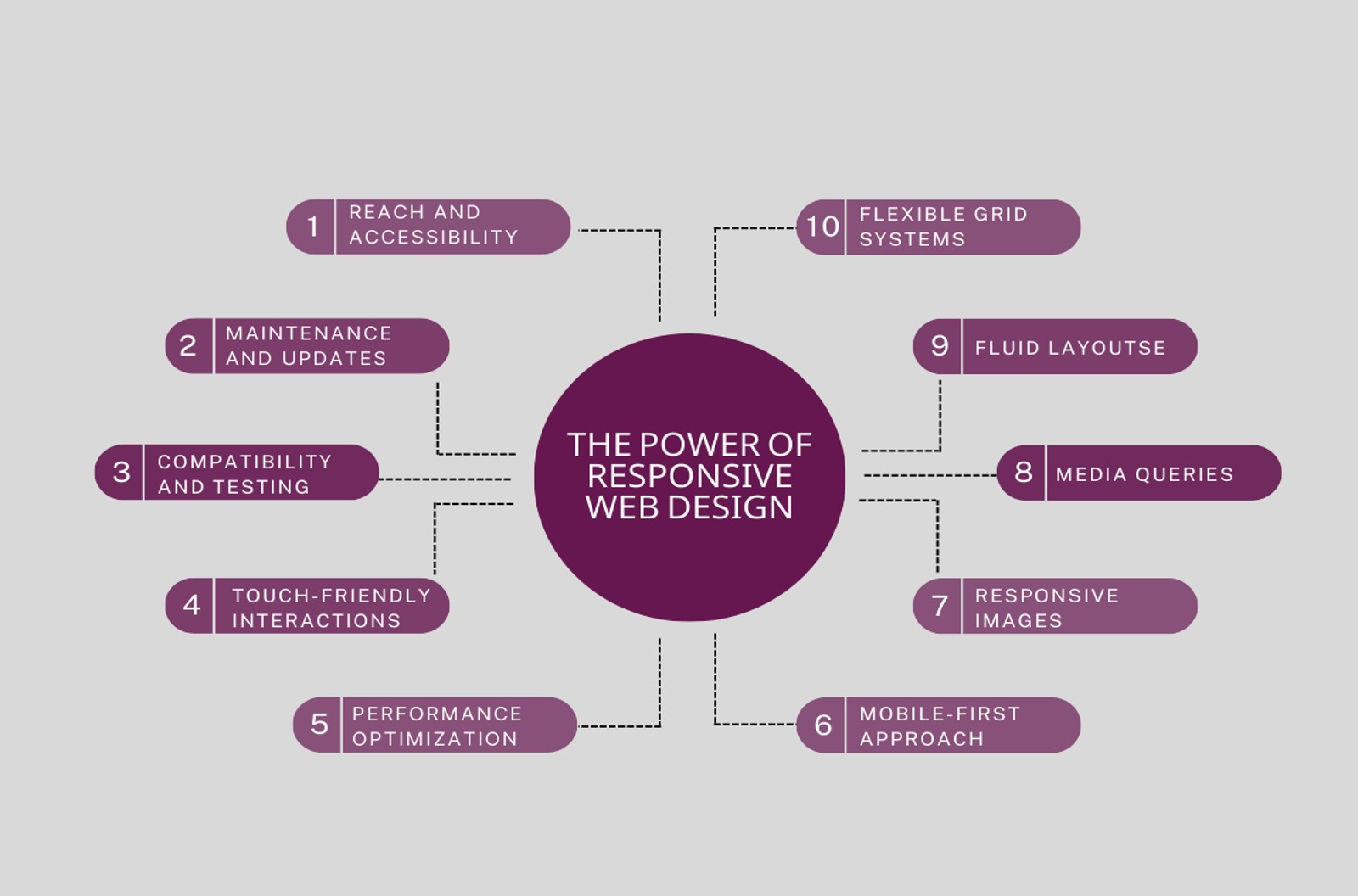
Responsive web design is a design approach that ensures websites adapt fluidly to the screen sizes and resolutions of various devices. By employing a flexible grid system, fluid layouts, media queries, and responsive images, websites can dynamically adjust their design and content to provide a seamless user experience.

Benefits of Responsive Web Design:

Responsive web design creates a consistent and intuitive browsing experience across devices. With responsive design, users can easily navigate websites and access information, regardless of the device they’re using. This leads to increased engagement, reduced bounce rates, and higher user satisfaction.

By embracing responsive design, websites can reach a wider audience, including mobile and tablet users. Additionally, responsive design ensures accessibility for users with disabilities, complying with web accessibility standards. This broadens the website’s reach and improves its visibility on search engines.

Responsive design aligns with Google’s mobile-first indexing, where search engines prioritize mobile-friendly websites in search results. By having a single URL and avoiding duplicate content issues, responsive design improves search engine visibility and rankings.

Key Components of Responsive Web Design:

Implementing grids and breakpoints allows websites to adapt their layout based on different screen sizes. By setting appropriate proportions, websites maintain consistency and visual harmony across devices.

Fluid layouts use relative units like percentages to ensure elements adapt to available space. This flexibility enables content to fill the screen appropriately, creating a pleasing visual experience..

Media queries enable websites to apply different styles based on screen size, orientation, and device capabilities. Optimizing typography, layout, and images with media queries ensures optimal presentation on different devices.

Responsive design addresses the challenge of delivering appropriately sized images. By using responsive image techniques such as srcset and sizes, websites can serve images that are optimized for each device, resulting in faster page load times.

Best Practices for Implementing Responsive Web Design:

Adopt a mobile-first mindset during the design and development process. Start by designing for mobile devices and progressively enhance the experience for larger screens.

Optimize website performance by reducing file sizes, minimizing HTTP requests, and leveraging caching techniques. Improved performance enhances user experience, search engine rankings, and mobile usability.

Design websites with touch-friendly interactions in mind. Optimize touch targets and spacing to ensure ease of use on mobile devices, enhancing overall usability.

Overcoming Challenges and Pitfalls:

Testing websites across different devices, browsers, and platforms can be challenging. Use compatibility testing tools and perform thorough cross-browser and device testing to ensure a consistent experience.

Regular maintenance and updates are crucial to ensure the continued responsiveness and functionality of the website. Prioritize updates to maintain compatibility with new devices and technologies.

Responsive web design is a powerful approach that ensures websites deliver exceptional user experiences across devices. By embracing responsive design principles, businesses can engage users, increase their reach, and improve their search engine visibility. In today’s mobile-driven world, responsive web design is not just a trend but a necessity for success in the digital landscape.
Remember to optimize the article

Discover the potential of using WordPress for your ecommerce business. Learn how WordPress offers a user-friendly, cost-effective, and customizable platform for creating a successful online store. Read on to explore the benefits and possibilities of using WordPress for ecommerce.

Ecommerce has become a crucial part of business in the digital age.

According to E Marketer, global ecommerce sales are projected to reach $4.9 trillion by 2025. While dedicated ecommerce platforms like Shopify and Magento dominate the market, many businesses wonder if they can use a versatile platform like WordPress for ecommerce. In this article, we’ll explore the advantages and potential drawbacks of using WordPress for ecommerce.

Advantages of Using WordPress for Ecommerce –

WordPress is a versatile platform that has evolved beyond its origins as a blogging platform. Here are some of the advantages of using WordPress for ecommerce:

Flexibility and Customization:

With thousands of themes and plugins available, WordPress offers a high degree of flexibility and customization options for ecommerce sites. This means you can tailor your site to your specific business needs.

SEO-Friendly :

 WordPress is built with strong SEO features, which can help improve your site’s search engine rankings. With plugins like Yoast SEO, you can optimize your product pages and blog posts for search engines.

Ease OF use:

Even non-technical users can easily manage a WordPress site. The platform’s intuitive user interface and drag-and-drop page builders make it easy to add and edit content, products, and categories.

Security:

WordPress regularly releases security updates, making it a safe and secure platform for ecommerce. Additionally, there are several security plugins available that can help protect your site from attacks.

How WordPress can be used for Ecommerce-

WordPress has several ecommerce plugins available, with Woo Commerce being the most popular. Here’s how you can set up an ecommerce site using WordPress:

Install WordPress and WooCommerce.

Set up payment gateways and shipping options.

Customize your site’s design and layout.

Add your products, categories, and tags.

Set up your tax and shipping rules.

Using plugins, you can also add additional ecommerce features to your site, such as subscription models, product reviews, and email marketing.

Potential Drawbacks of Using WordPress for Ecommerce-

While WordPress is a flexible platform for ecommerce, it does have some potential drawbacks:

Complexity:

Setting up and managing an ecommerce site on WordPress can be more complex than using dedicated ecommerce platforms like Shopify. This is because you have to manage both your site’s design and functionality.

Limited Support:

WordPress doesn’t have the same level of support as dedicated ecommerce platforms. This means you may have to rely on community forums and third-party plugins for support.

Security:

While WordPress is secure, it can be vulnerable to attacks if plugins are not regularly updated. This means you need to be diligent about updating your site’s plugins and monitoring for security issues.

Comparison with Other Ecommerce Platforms-

WordPress may not be the best choice for every business looking to set up an ecommerce site. Here’s how it compares to other popular ecommerce platforms:

Shopify:

Shopify is an all-in-one ecommerce platform that’s easy to set up and use. It has a lower learning curve than WordPress and offers more extensive support options. However, it can be more expensive than WordPress.

Magento:

Magento is a popular open-source ecommerce platform. It’s more powerful than WordPress and offers more customization options, but it requires more technical expertise to set up and maintain.

Conclusion:

WordPress is a versatile platform that can be used for ecommerce, but it may not be the best choice for every business. If you’re looking for a flexible, customizable platform with strong SEO features, WordPress could be a good option. However, if you’re looking for a simpler, more supported ecommerce platform, you may want to consider Shopify or Magento. Ultimately, the best platform for your business will depend on your specific needs and goals.


 In this blog post, we’ll share tips on how to improve your website’s speed and enhance the overall user experience.

 Website speed is a critical factor in user engagement, with slow-loading websites leading to high bounce rates and lost revenue. In this blog post, we’ll share tips on how to improve your website’s speed and enhance the overall user experience.

Optimize Your Images:

Large images can significantly slow down your website. Optimize your images by compressing them without sacrificing quality. There are various tools available online, such as TinyPNG or Optimizilla, that can help you compress your images.

Minimize HTTP Request:

Each element on your website, such as images, scripts, and stylesheets, require a separate HTTP request to load. Reduce the number of HTTP requests by minimizing the number of elements on your website or by combining multiple elements into a single request.

Use a Content Delivery Network(CDN):

A CDN can improve website speed by storing copies of your website’s files in multiple data centers around the world. This reduces the distance that data needs to travel, resulting in faster loading times.

Reduce Server Response Time:

Server response time refers to the time it takes for your website to respond to a user’s request. A slow server response time can significantly affect website speed. Ensure that your server response time is optimized by choosing a reliable hosting provider and optimizing your website’s code.

Use Cashing:

 Caching is a technique that stores frequently accessed data in the user’s browser, allowing the website to load faster     upon subsequent visits. Use caching plugins or implement server-side caching to speed up your website.

Conclusion:

Website speed is critical to user engagement and can significantly affect your website’s performance. By optimizing your images, minimizing HTTP requests, using a CDN, reducing server response time, and using caching, you can improve your website’s speed and provide a better user experience.

If you’re looking for assistance with website design and development for your company, I can certainly help you out. Here are some steps you can take to get started:

Determine your website goals:

Before starting the design and development process, it’s essential to determine your website’s goals. Do you want to generate leads, promote your brand, or sell products online? Knowing your objectives will help guide the design and development process.

Choose a platform:

There are many website platforms available, such as WordPress, Squarespace, and Wix. Choose a platform that fits your needs, budget, and technical expertise.

Hire a web developer:

If you’re not familiar with website design and development, it’s best to hire a professional web developer. They can guide you through the process, ensure that your website is responsive, optimized for search engines, and secure.

Design your website:

Once you’ve chosen a platform and hired a web developer, it’s time to design your website. This process involves creating a layout, choosing colors and fonts, and selecting images.

Develop your website:

After designing your website, your web developer will develop it. They’ll write code, install plugins, and test your website to ensure that it’s working correctly.

Launch your website:

Once your website is developed, it’s time to launch it! Make sure to test your website thoroughly before launching it to the public.

I hope these steps help you get started with designing and developing your company’s website. Let me know if you have any questions or need further assistance!


Contact Us

Today we will learn about elementor tools and how to use them.

Prerequisites

  1. Elementor Plugin Installed on your WordPress Website
  2. Create new page or edit the existing page in Elementor.

Elementor Editor Sidebar


Add New Section

Click on Plus button to add a new Section.

Click on 1 column layout from available structures.

You will find 3 ways to edit the added section. Layout, Style & Advanced.

Each Section is surrounded by a blue border and has 3 controls on the top.
These 3 actions are: Add Section, Edit Section & Delete Section.

Column element is surrounded by dotted border and you can edit the column by clicking on edit column icon on the right top corner.

Without making any changes to the Section or Column. Will now add elements to our 1st Section. Using elemetor editor sidebar  you can drag and drop element into the column. 

mastertej vedio
mastertej image
mastertejicon
mastertejmaps1

Previous
Next

You will find 3 ways to edit the added element.

Content: Here you can add the text or images in the selected element.
Style: Here you can edit the appearance of the element like backgrounds, fonts, alignment and more.
Advanced: Here you can edit the position of the element, its padding and margins, transitions, effects and more.

Navigator

How to use Navigator-

You have three simple options to open the Navigator window:

  1. Right-click any element and then click on Navigator. This automatically redirects you to the specific element in the navigation tree.

 2.Use Click on the layers icon in the footer of the panel.

3.The keyboard shortcut Cmd/Ctrl+I.

Update Or Publish

Click on Update or Publish button at the bottom of Elementor Editor Sidebar to save your changes.